TLS Termination
before going further, lets quickly understand reverse proxy -
It basically hides the backend servers from internet
Responsibility of this web server is usually - load balancing, ssl termination, caching, relaying request to next web server specified in there config files.
Common examples are nginx, HAProxy, Traefik (new standard).
in k8s world, an Ingress Controller acts as a reverse proxy.
okay now we understand TLS,
it is a protocol to establish a secure connection between browser and server.
latest version on this protocol is TLS 1.3 which is establishes a secure connection with just 1 Round Trip (RTT) after TCP connection is established.
the previous version which is TLS 1.2 uses 2 round trips (RTT) to create secure connection.
secure connection is basically using cryptography - to create keys so that only server can decrypt the data which browser sends, using its key (usually called as private key), but the actual implementation is more nuanced, you can read more about TLS 1.3 and TLS 1.2.
let’s understand “certificate”
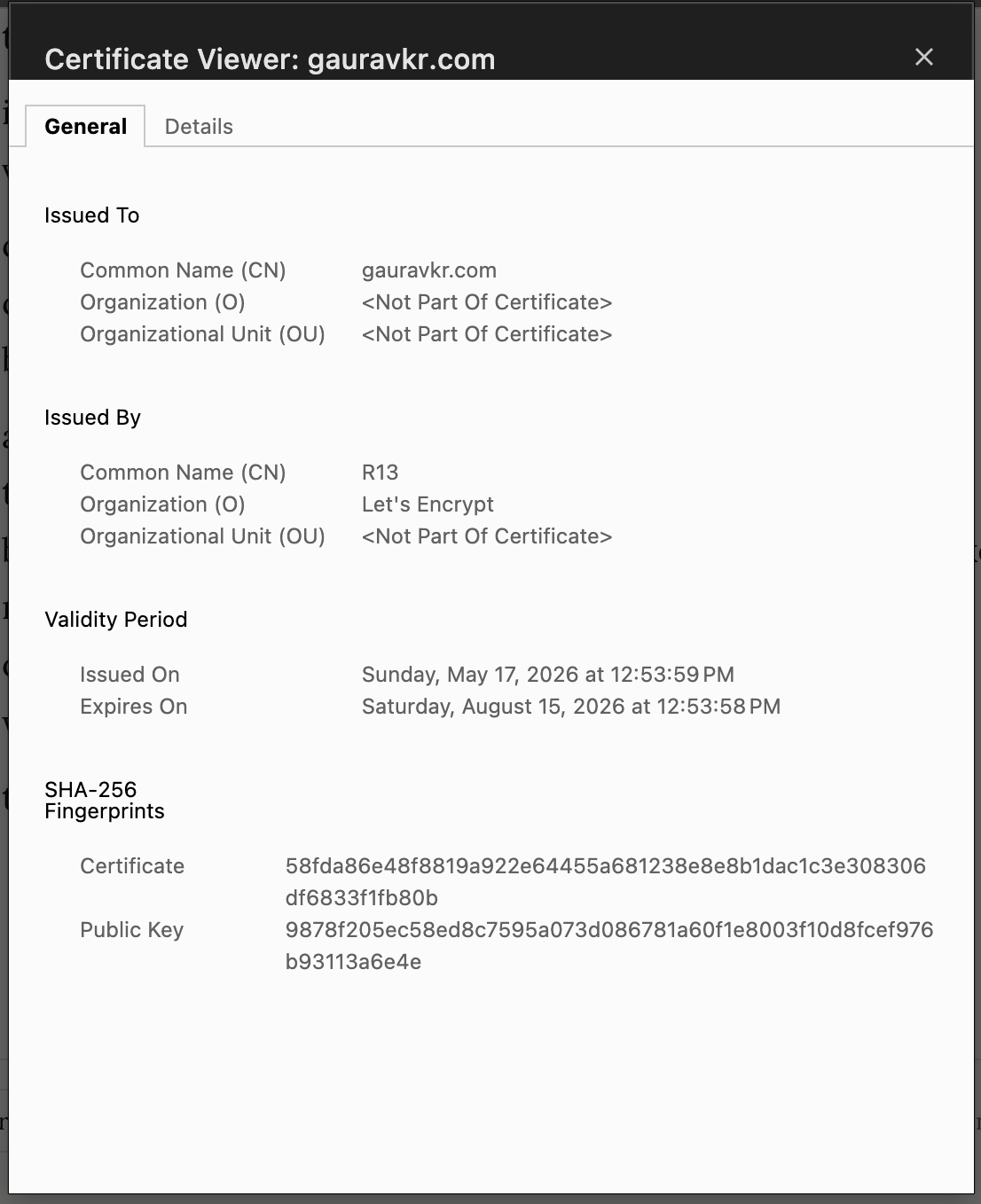
this is a file which server sends to browsers.
it has fields like Issued by, certificate fingerprint, public key, validity.
certificate fingerprint is used by browser to verify is the certificate is not tampered in between after server sent it to browser.
and public key is used by browser to decrypt a peiece of data that was signed by the server using its private key, and if browser is able to decrypt that peice of data using the public key mentioned on the certificate, it proves that the server is the owner of that certificate. this peice of data is sent by server when doing TLS handshake.
the file is basically a
.crtfile which server holds.this certicate can only be issued by handful of orgs called as “Certificate Authority”. Popular examples are “Let’s Encrypt”, “DigiCert” etc.
How browser knows that Certificate Authority which issued the certificate is valid ?
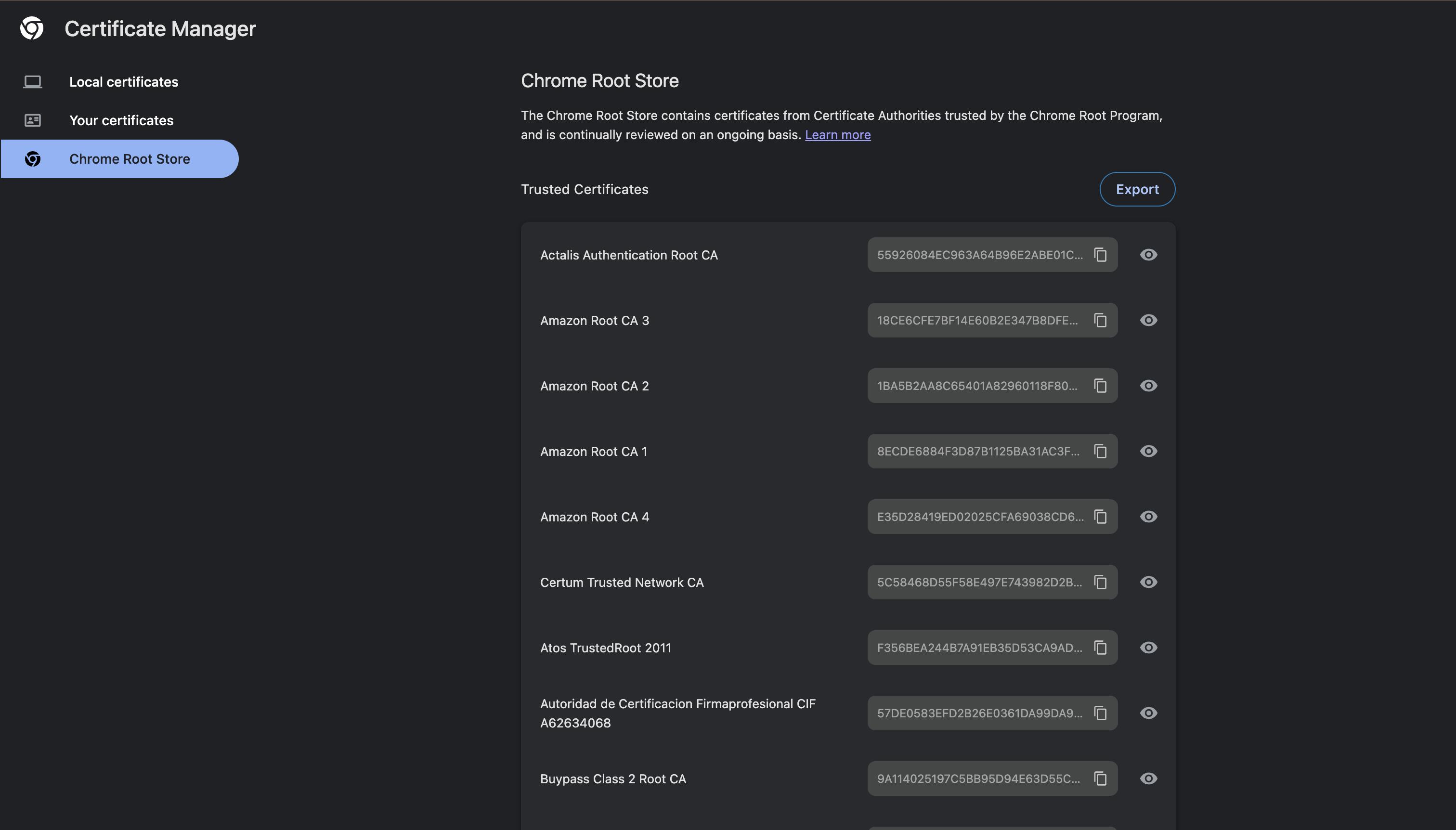
Browsers already know what are valid “Certificate Authorities” are,
the list is inbuilt in the browser, and along with this the OS also provides the browser valid “Certificate Autorities”
So when it gets the certificate from server, it cross checks if the certificate is issued by a valid authority, if not, it throws error -
NET::ERR_CERT_AUTHORITY_INVALID, this list is continuosly updated by the browser companies like google, mozilla with browser patch versionsIf we want to create a custom certificate which is issued by an non recognized tool like -
mkcert, but if you use this tool to create a certificate, you will need to manually update the “Certificate Authorities” list on the browser to make sure that browser recognizes the issuer of this certificate. This issuer is basically custom (any name). And this is how you can create a locally trusted environment.
How to get certificate from Certificate Authority ?
we generate 2 files using
openssl’s Certificate Request utility.
openssl req -newkey rsa:2048 -nodes -keyout mydomain.key -out mydomain.csrfile 1 -
mydomain.key- this holds the private keyfile 2 -
mydomain.csr- this is a public key which has set of data (like domain name etc) which we give to Certificate Authority tools to get the certificate in return.crtfile. sample value -
-----BEGIN CERTIFICATE REQUEST-----
MIICTDCCAbQCAQAwRzELMAkGA1UEBhMCVVMxCzAJBgNVBAgMAk5ZMRIwEAYDVQQH
DAZNYW5oYXQxFzAVBgNVBAMMDm15ZG9tYWluLmNvbTCCASIwDQYJKoZIhvcNAQE...
-----END CERTIFICATE REQUEST-----
and now once we have the .crt file and the private key generated previously. we point our reverse proxy server to these 2 file’s storage location so that they can do further processing like serving the certificate to browsers, decrypting the data on the wire etc.
example for nginx - /etc/nginx/sites-available/default -
server {
    # 1. Listen on Port 443 (The standard port for secure HTTPS traffic)
    listen 443 ssl;
    server_name mydomain.com;

    # 2. Point NGINX to your certificate files
    ssl_certificate /etc/ssl/certs/mydomain.crt;
    ssl_certificate_key /etc/ssl/private/mydomain.key;

    # 3. Optimize SSL settings (Security best practices)
    ssl_protocols TLSv1.2 TLSv1.3;
    ssl_ciphers HIGH:!aNULL:!MD5;

    # 4. The TLS Termination point! Pass raw HTTP to your backend application
    location / {
        proxy_pass http://127.0.0.1:8080; # Your internal Node/Python app running on port 8080
        proxy_set_header Host $host;
        proxy_set_header X-Real-IP $remote_addr;
    }
}
though we can also use certbot tool created by “Let’s Encrypt” which does above things under the hood.
sudo certbot --nginx -d mydomain.comHow do Certificate Authority verify domain ownership while issuing the certificate ?
For this, the Certificate Authority needs to verify that you actually own the domain, and they issue a challenge for this, so basically they ask you to add some DNS records and once done, they check if the DNS records are valid to confirm the ownership of domain.
the overall steps -
user types “https://google.com” in browser
browser does DNS lookup and gets the server IP.
now browser establishes TCP connection with the given server’s IP. (sends SYN packet, server replies with SYN-ACK and then browser sends ACK again)
then browser sends “ClientHello” message which has its supported TLS versions and cryptographic algorithms (cipher suites).
server responds with choosen Cipher and TLS certificate.
browser verifies the certificate (as mentioned above) and its fields like validity etc.
key exchange takes place (nuances depends on the version of TLS being used)
finally browser generates the actually http request, encrypts it with key and transits to the network using OS which in turn uses network interface card (NIC) to transmit the packets.